
Introduction
In today’s fast-paced world, staying productive is no longer just an advantage—it’s a necessity. Whether you are a student, a freelancer, or part of a corporate team, managing tasks, time, and projects efficiently can make a huge difference in achieving your goals. This is where Top Productivity Software comes into play. The right tools can help you organize your work, streamline communication, track progress, and even reduce stress.
With so many options available, beginners often feel overwhelmed about which software to choose. Meanwhile, intermediate users want tools that offer more advanced features without a steep learning curve. The best productivity software strikes a balance: it is user-friendly, versatile, and adaptable to different work styles.
What is Top Productivity Software?
Productivity software refers to applications and tools designed to help individuals or teams complete tasks more efficiently. These tools cover a wide range of functions, including task management, time tracking, note-taking, project collaboration, communication, and automation of repetitive processes.
Essentially, productivity software acts as a digital assistant. It helps users plan their day, organize tasks, communicate seamlessly, and maintain focus on high-priority activities. Unlike generic applications, these tools are specifically tailored to enhance efficiency and ensure that work gets done with minimal friction.
Some common examples of productivity software include:
- Task management apps like Todoist or Microsoft To Do
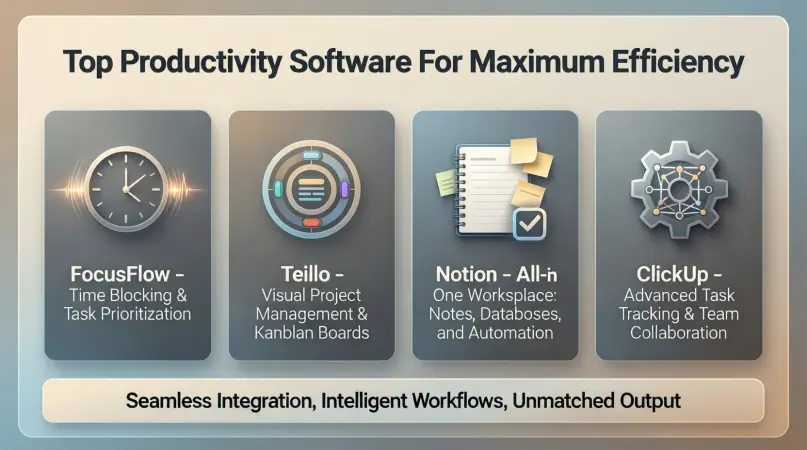
- Project management tools like Trello, Asana, or ClickUp
- Communication platforms like Slack or Microsoft Teams
- Time tracking software like RescueTime or Toggl
- Note-taking applications like Evernote or Notion
The key idea is that top productivity software is not just about completing tasks—it’s about doing them smarter, faster, and with better organization.
Why is Top Productivity Software Important?
Using the right productivity software can significantly impact both personal and professional outcomes. Here’s why it matters:
- Improved Time Management: Tools like calendars, timers, and reminders prevent wasted time and help prioritize tasks.
- Enhanced Collaboration: Team-based software enables smooth communication, file sharing, and real-time updates.
- Better Organization: From task lists to project boards, productivity software keeps information structured and accessible.
- Increased Accountability: Many apps offer progress tracking and performance reports to keep users accountable.
- Reduced Stress: Knowing what needs to be done and having tools to manage it minimizes the mental load.
- Scalability: Productivity software grows with your needs, whether you’re managing a small team or a large organization.
Without productivity tools, it’s easy to get lost in endless emails, scattered notes, and forgotten deadlines. Software solutions streamline workflows and ensure that important tasks are not overlooked.
Detailed Step-by-Step Guide to Using Top Productivity Software
Choosing and using productivity software effectively requires a systematic approach. Here’s a step-by-step guide:
Step 1: Identify Your Needs
Before selecting any software, understand what you want to achieve. Ask yourself:
- Do I need help with task management, time tracking, or team collaboration?
- Am I working alone, or do I need a tool for multiple team members?
- Do I prefer simplicity or advanced features?
This clarity will prevent you from spending money or effort on tools that don’t match your workflow.
Step 2: Research and Compare Options
Once your needs are clear, explore software that aligns with them. Consider factors such as:
- User interface and ease of use
- Key features (task management, collaboration, automation)
- Pricing (free, subscription, or one-time payment)
- Integration with other apps you already use
Example: Notion is great for customization, while Trello is ideal for visual task boards.
Step 3: Test Free Versions or Trials
Most productivity software offers a free plan or trial period. Use this opportunity to:
- Explore features hands-on
- Check compatibility with your devices
- Evaluate whether it fits your workflow
Testing multiple options can help you avoid investing in software that doesn’t meet your expectations.
Step 4: Set Up Your Workspace
After selecting software, take time to set it up properly:
- Create projects, tasks, or categories
- Set deadlines, priorities, and reminders
- Add collaborators if working in a team
A well-structured setup ensures you benefit from all the features and avoid confusion later.
Step 5: Integrate with Other Tools
Many productivity apps integrate with email, calendars, cloud storage, and other software. Examples include:
- Syncing Google Calendar with Todoist
- Connecting Slack with Trello for updates
- Automating tasks with Zapier or IFTTT
Integration saves time by reducing repetitive work and centralizing your workflow.
Step 6: Monitor and Adjust
Using software is not a one-time setup. Regularly:
- Track your progress
- Analyze reports and insights
- Adjust priorities and workflow as needed
Continuous evaluation ensures you are maximizing efficiency without overcomplicating your process.
Benefits of Top Productivity Software
Here are the major advantages of using productivity software:
- Time Efficiency: Automate repetitive tasks and stay focused.
- Improved Collaboration: Share tasks, files, and feedback seamlessly.
- Clear Prioritization: Identify what’s important and focus on high-impact activities.
- Reduced Errors: Automation reduces human errors in tracking and deadlines.
- Better Organization: Centralized workspace for tasks, notes, and projects.
- Enhanced Motivation: Visual progress and reminders keep you on track.
- Scalable Solutions: Works for individuals and teams alike.
- Data Insights: Track performance and adjust strategies based on reports.
Disadvantages / Risks of Productivity Software
While useful, these tools also come with some drawbacks:
- Overcomplexity: Some apps have too many features, causing confusion.
- Dependence on Internet: Cloud-based software requires internet access.
- Subscription Costs: Premium versions may be expensive.
- Learning Curve: Advanced tools require time to master.
- Distraction Risk: Notifications can interrupt focus if not managed.
- Data Privacy: Storing sensitive information in apps may pose security risks.
Understanding these limitations helps users make informed choices and adopt best practices.
Common Mistakes to Avoid
- Choosing Software Without a Plan: Know your goals before selecting a tool.
- Overloading with Features: Only use features you need to avoid clutter.
- Ignoring Integration Options: Lack of connectivity can fragment your workflow.
- Neglecting Updates: Regularly update apps to benefit from improvements and security.
- Not Reviewing Progress: Failing to monitor effectiveness leads to wasted effort.
- Using Too Many Tools: Juggling multiple apps reduces efficiency instead of enhancing it.
Avoiding these mistakes ensures that productivity software genuinely improves your work rather than complicates it.
FAQs About Top Productivity Software
1. What is the best productivity software for beginners?
For beginners, tools like Todoist, Trello, and Microsoft To Do are ideal. They are simple, intuitive, and provide essential features without overwhelming users.
2. Can productivity software improve team collaboration?
Absolutely. Tools like Asana, ClickUp, and Slack allow team members to communicate, share files, and track project progress in real-time, enhancing collaboration and reducing miscommunication.
3. Are free productivity apps effective?
Yes. Many free plans provide core features sufficient for personal or small-scale use. However, premium versions offer advanced functionalities like automation, analytics, and larger storage.
4. How can I avoid distractions while using productivity software?
Manage notifications carefully, focus on one task at a time, and use “focus modes” or minimal interfaces provided by apps like Notion or Trello.
5. Is cloud-based or offline productivity software better?
Cloud-based software offers accessibility from multiple devices, real-time updates, and collaboration. Offline software is useful when internet access is unreliable. The choice depends on your needs.
6. Can productivity software replace manual planning?
Yes, it can replace traditional planners and spreadsheets by automating task tracking, setting reminders, and providing insights. However, combining digital tools with personal discipline yields the best results.
7. How do I choose the right productivity software for my team?
Assess your team size, workflow complexity, and collaboration needs. Test multiple tools through free trials and choose the one that balances simplicity, functionality, and scalability.
8. Does productivity software work for students?
Absolutely. Students can use apps like Notion, Evernote, or Google Keep to organize notes, manage deadlines, and plan study schedules efficiently.
Expert Tips & Bonus Points
- Start Small: Begin with one or two apps and gradually add more if needed.
- Use Templates: Many tools offer templates for project boards, calendars, and task lists to save setup time.
- Automate Repetitive Tasks: Tools like Zapier can link multiple apps and automate workflows.
- Track Productivity Trends: Regularly review time spent on tasks to identify areas for improvement.
- Set Clear Priorities: Use the Eisenhower Matrix or task tagging to differentiate urgent vs important tasks.
- Backup Data: Ensure your productivity data is backed up, especially when using cloud services.
- Combine Tools Wisely: For example, use Trello for visual project management and Slack for communication.
- Continuous Learning: Stay updated with software updates and new productivity techniques.
Conclusion
In the modern world, effective time and task management is crucial, whether you are a student, freelancer, or part of a growing team. Top productivity software can be a game-changer, offering structure, efficiency, and clarity in your work. By choosing the right tools, setting them up correctly, and using them consistently, you can dramatically improve focus, collaboration, and overall performance.
While every tool has pros and cons, the key is to match software with your workflow and needs. Start small, explore features, and gradually integrate advanced functionalities as you gain experience. Remember, productivity software is not just about completing tasks—it’s about achieving more in less time while maintaining balance and reducing stress.