
Introduction
Troubleshooting is an essential skill in today’s tech-driven world. Whether you’re dealing with computer issues, smartphone glitches, or network problems, knowing how to troubleshoot effectively saves time, money, and frustration. A proper Troubleshooting Guide helps users identify the root cause of a problem and implement practical solutions in an organized manner.
Many beginners feel overwhelmed when they face unexpected technical issues. It is common to panic, try random fixes, or even risk causing more damage. This is where a structured troubleshooting guide becomes a lifesaver. By following systematic steps, even someone with minimal experience can resolve issues quickly.
What is Troubleshooting?
Troubleshooting is the process of identifying, diagnosing, and resolving problems in systems, devices, or software. It is a structured approach that helps users understand what went wrong and find the best solution. Troubleshooting is not limited to technology; it can also be applied to everyday situations, such as mechanical issues, appliance failures, and workflow problems.
The main goal of troubleshooting is to restore normal function and prevent recurring problems. Unlike random trial-and-error fixes, proper troubleshooting follows a logical sequence. This includes identifying the issue, gathering information, analyzing possible causes, testing solutions, and implementing a permanent fix.
For example, if your computer is not connecting to the internet, troubleshooting involves checking the network settings, inspecting the router, verifying cables, and testing the connection systematically until the problem is resolved. This structured approach ensures efficiency, accuracy, and reduced stress.
Why is Troubleshooting Important?
Troubleshooting is important for several reasons:
- Saves Time and Effort: Random attempts to fix a problem often waste time. Troubleshooting ensures you take the most direct and effective approach.
- Reduces Costs: Professional repairs or replacements can be expensive. Proper troubleshooting often allows you to fix issues without outside help.
- Prevents Damage: Misguided attempts to solve a problem may worsen the situation. Following a structured guide minimizes risk.
- Boosts Confidence: Knowing how to troubleshoot gives you confidence to handle technical issues independently.
- Improves Efficiency: Identifying recurring problems and their causes helps prevent future disruptions, improving overall productivity.
In short, troubleshooting is not just a reactive skill; it’s proactive. It helps you anticipate problems, take preventive measures, and maintain smooth operations in your personal or professional environment.
Detailed Step-by-Step Guide
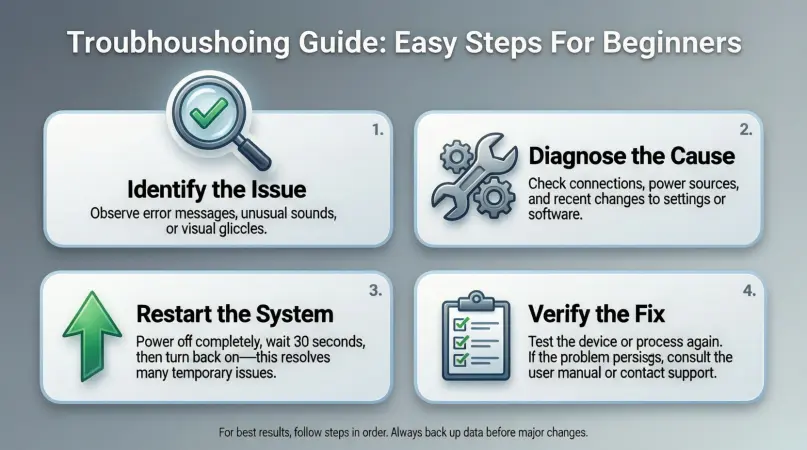
Here’s a complete, step-by-step troubleshooting guide to tackle common issues effectively.
Step 1: Identify the Problem
The first step in troubleshooting is understanding the exact issue. Ask yourself:
- What exactly is not working?
- When did the problem start?
- Were there any recent changes to the system or device?
Example: If a printer is not working, check whether it’s a paper jam, connectivity issue, or driver problem.
Step 2: Gather Information
Collect details about the problem. This includes:
- Error messages or codes
- Recent updates or installations
- User actions leading up to the problem
Example: If your phone keeps restarting, note if it happens after installing a new app or updating the OS.
Step 3: Analyze Possible Causes
List all possible reasons for the issue. Categorize them as software, hardware, or network-related.
Example: Slow internet could be due to router settings, ISP issues, device settings, or malware.
Step 4: Test Solutions Systematically
Start with simple solutions before moving to complex fixes. Always test one solution at a time to identify what works.
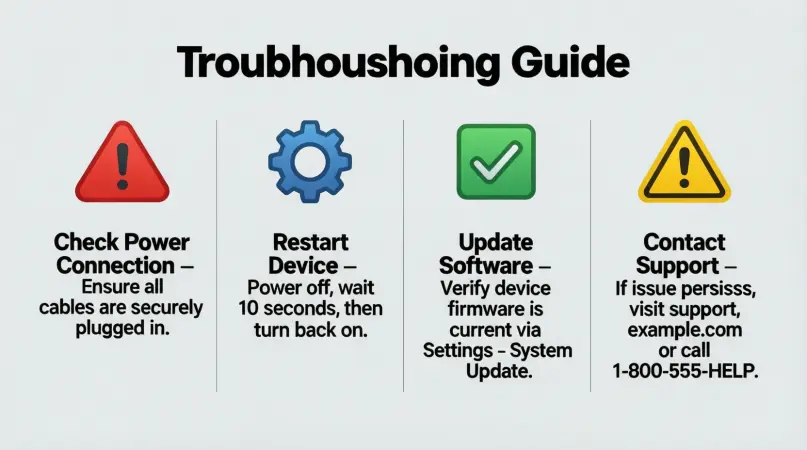
- Restart the device
- Update software or drivers
- Check cables and connections
- Disable recently installed applications
Example: If your laptop won’t boot, try restarting in safe mode before reinstalling the operating system.
Step 5: Implement a Permanent Fix
Once you identify the root cause, apply the appropriate fix:
- Replace faulty hardware
- Reinstall software or drivers
- Adjust settings for optimal performance
- Clear caches or reset configurations
Step 6: Verify the Solution
After applying the fix, test the system to ensure the issue is resolved.
- Run relevant tests or tasks
- Observe for recurring problems
- Ensure performance is back to normal
Step 7: Document the Process
Keep a record of the problem and solution. Documentation helps:
- Solve future issues faster
- Share knowledge with others
- Track recurring problems
Benefits of Troubleshooting
Troubleshooting offers numerous benefits:
- Quick Problem Resolution: Reduces downtime and frustration.
- Cost Efficiency: Minimizes repair and replacement expenses.
- Knowledge Building: Enhances technical understanding over time.
- Proactive Maintenance: Helps anticipate and prevent future issues.
- Improved Productivity: Ensures systems and devices function smoothly.
- Reduced Dependence: Less reliance on external technical support.
Disadvantages / Risks
While troubleshooting is highly beneficial, there are some risks:
- Time-Consuming: Without proper guidance, troubleshooting can take longer.
- Potential Damage: Incorrect attempts may worsen hardware or software issues.
- Frustration: Repeated failures can lead to stress, especially for beginners.
- Data Loss: Some troubleshooting steps, like system resets, may delete important data.
- Limited Scope: Not all problems can be fixed without professional help.
Common Mistakes to Avoid
To troubleshoot effectively, avoid these common mistakes:
- Skipping Steps: Jumping straight to complex fixes without understanding the issue.
- Ignoring Backups: Failing to back up data before attempting fixes.
- Overlooking Simple Solutions: Sometimes a restart or basic check resolves the problem.
- Making Multiple Changes at Once: Makes it difficult to identify the real cause.
- Not Documenting: Forgetting what worked and what didn’t for future reference.
- Panic Fixing: Rushing can lead to mistakes and additional issues.
FAQs
1. What is the first step in troubleshooting?
The first step is to identify the problem clearly. Know exactly what is not working, when it started, and any recent changes that may have caused it.
2. How long should troubleshooting take?
Troubleshooting time depends on complexity. Simple issues may take minutes, while complex ones could take hours. Following a structured guide helps reduce unnecessary delays.
3. Can troubleshooting cause data loss?
Yes, certain fixes like system resets, software reinstallations, or hardware replacements can lead to data loss. Always back up important files before starting.
4. Is troubleshooting only for computers?
No. Troubleshooting applies to software, hardware, networks, appliances, and even workflows in daily life.
5. How do I know the problem is fixed?
Verify by running tests, using the system normally, and ensuring the issue does not recur. If the problem persists, reassess possible causes.
6. Should beginners attempt troubleshooting?
Yes, beginners can troubleshoot effectively by following a step-by-step guide. Start with simple solutions and gradually learn more advanced techniques.
7. What tools are useful for troubleshooting?
Common tools include diagnostic software, network testers, multimeters, system logs, and backup software. The choice depends on the type of issue.
8. How can I avoid future problems?
Regular updates, system maintenance, backups, and monitoring performance can prevent many common issues.
Expert Tips & Bonus Points
- Start Simple: Always try basic solutions before moving to advanced fixes.
- Use Checklists: A checklist ensures you don’t miss any steps.
- Keep Learning: Document your troubleshooting experiences to improve your skills.
- Stay Calm: A calm mind identifies problems faster than panic.
- Leverage Community Forums: Online communities can offer helpful insights.
- Use Diagnostic Tools: Tools like network analyzers or software debuggers can save time.
- Backup Regularly: Prevent data loss with routine backups.
- Practice Preventive Maintenance: Regular updates, cleanups, and scans reduce problems.
Conclusion
Troubleshooting is an indispensable skill that anyone can master with the right approach. By understanding what troubleshooting is, why it is important, and how to implement it step by step, beginners and intermediate users can confidently solve problems without unnecessary stress.
Following a structured guide ensures efficiency, reduces costs, prevents damage, and improves overall productivity. Avoid common mistakes, apply expert tips, and document your process to become more proficient over time. Whether you are dealing with software errors, hardware failures, or connectivity problems, a systematic troubleshooting approach helps restore functionality quickly and effectively.